
OpenClaw
- Homepage: openclaw.ai
- Install docs: docs.openclaw.ai/start/getting-started
- Model / gateway configuration: docs.openclaw.ai/concepts/model-providers
- Protocol: OpenAI-compatible (Chat Completions) / Anthropic Messages
Install
OpenClaw is distributed as an npm package and depends on Node.js at runtime. System requirements: Node.js 24 is recommended (Node 22.19+ is also supported); check your current version with node --version. Windows users can also use the native Hub desktop app — see the official Windows docs.
The methods below are the ones the project recommends; for anything else, defer to the official install docs.
Install script (recommended)
macOS / Linux:
curl -fsSL https://openclaw.ai/install.sh | bashWindows (PowerShell):
iwr -useb https://openclaw.ai/install.ps1 | iexnpm fallback (requires Node.js 22.19+ installed first)
npm install -g openclaw@latestAfter install, verify with openclaw --version. Then run the onboarding wizard and install the background service (the Gateway daemon):
openclaw onboard --install-daemonThe wizard guides you through choosing a model provider, entering an API key, and configuring the Gateway. Outside the wizard, this document shows how to point the model provider at TokenBay manually.
Connect TokenBay
OpenClaw abstracts every model source as a provider, and model references are uniformly written in the provider/model form. To connect TokenBay, just add a custom provider (an OpenAI-compatible proxy) via models.providers.<id> in the config file ~/.openclaw/openclaw.json, point its baseUrl at TokenBay, set its apiKey to your TokenBay key, and set the default model agents.defaults.model.primary to tokenbay/<model name>.
Base URL note: OpenClaw’s
openai-completionsadapter automatically appends/chat/completionsafterbaseUrl. So here you fill in the OpenAI-style address with/v1,https://api.tokenbay.com/v1, which makes the actual requesthttps://api.tokenbay.com/v1/chat/completions. This is a special case of OpenClaw configuration — the TokenBay gateway’s own Base URL ishttps://api.tokenbay.com(no path), and the client assembles the endpoint itself; OpenClaw’s/v1is part of that assembly.
1. Get an API key
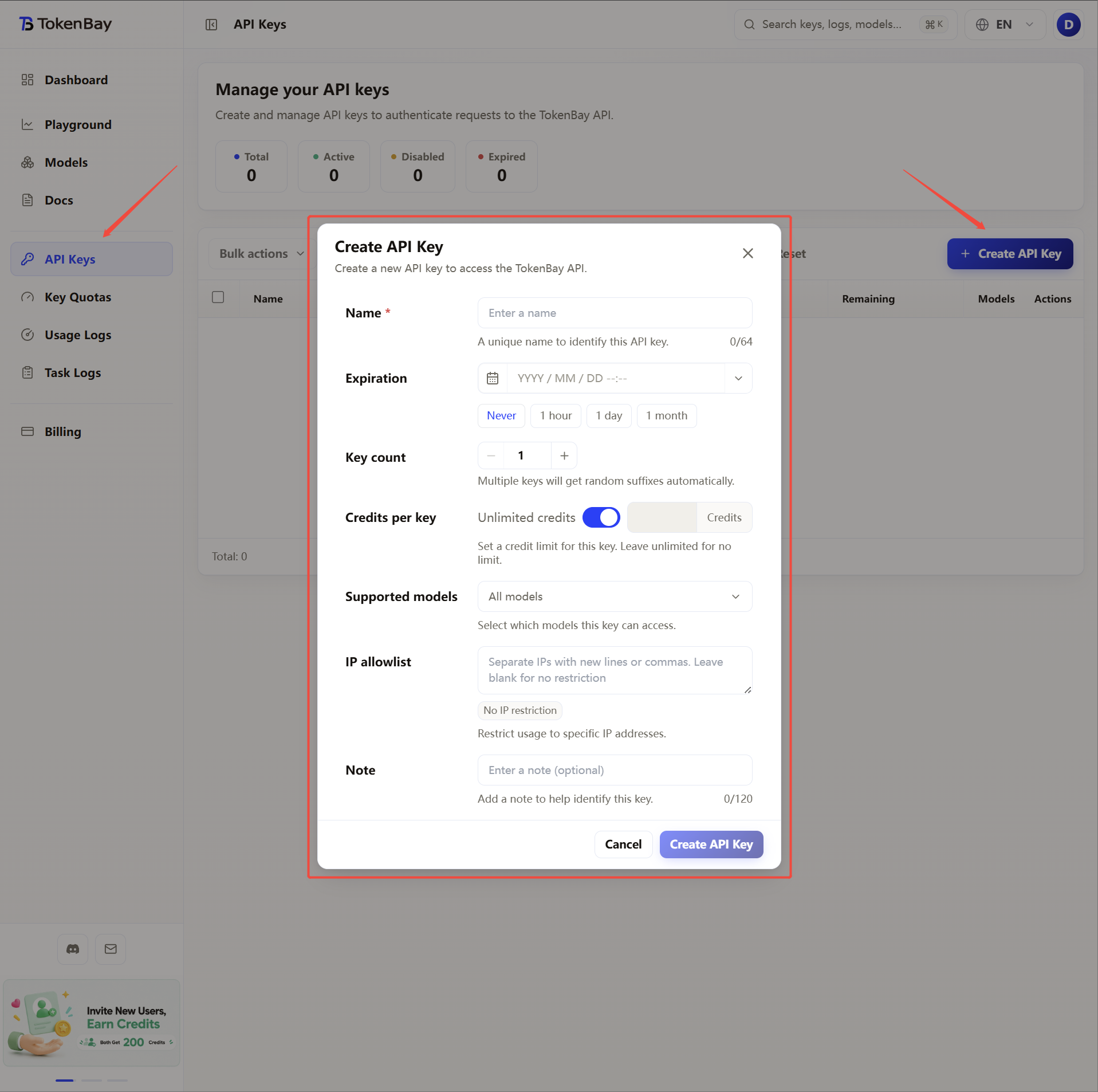
Log in to the TokenBay console → API keys → Create key. Copy the full string starting with sk-. The plain text shows only once and can’t be viewed again after you leave the page.
2. Configure environment variables
The OpenClaw config file supports referencing environment variables with ${VAR_NAME}, so we recommend keeping the key in an environment variable to avoid writing it as plain text in the config file. OpenClaw reads the parent process environment variables, and also reads .env in the current directory and the global ~/.openclaw/.env.
The variable to set:
| Variable | Value |
|---|---|
TOKENBAY_API_KEY | Your TokenBay API key (sk-...) |
macOS / Linux (zsh or bash)
Append the line below to ~/.zshrc or ~/.bashrc, then run source ~/.zshrc to apply it:
export TOKENBAY_API_KEY="sk-XXXXXXX"Windows (PowerShell, persistent user env)
[Environment]::SetEnvironmentVariable('TOKENBAY_API_KEY','sk-XXXXXXX','User')Windows (CMD)
setx TOKENBAY_API_KEY "sk-XXXXXXX"Both the PowerShell and CMD forms persist the env var at user scope — you need to open a new terminal window (and restart the Gateway) before it’s picked up.
You can also write it directly into OpenClaw’s global env file ~/.openclaw/.env:
TOKENBAY_API_KEY=sk-XXXXXXX3. Register the TokenBay provider in the config file
The config file lives at ~/.openclaw/openclaw.json (user-wide, global). The Gateway watches this file and hot-reloads changes automatically. Merge the models block below into your config:
{
  "agents": {
    "defaults": {
      "model": { "primary": "tokenbay/claude-sonnet-4.6" }
    }
  },
  "models": {
    "providers": {
      "tokenbay": {
        "baseUrl": "https://api.tokenbay.com/v1",
        "apiKey": "${TOKENBAY_API_KEY}",
        "api": "openai-completions",
        "timeoutSeconds": 600,
        "models": [
          { "id": "claude-sonnet-4.6", "name": "Claude Sonnet 4.6", "input": ["text", "image"] },
          { "id": "claude-opus-4.8",   "name": "Claude Opus 4.8",   "input": ["text", "image"] },
          { "id": "claude-haiku-4.5",  "name": "Claude Haiku 4.5",  "input": ["text", "image"] }
        ]
      }
    }
  }
}
If you’d rather not reference an environment variable, you can also write apiKey as the plain-text value "sk-XXXXXXX" (mind the security of the config file).
Alternative: write it directly with the CLI. If you don’t want to edit the JSON by hand, you can set values with one-liners:
openclaw config set models.providers.tokenbay.baseUrl "https://api.tokenbay.com/v1"
openclaw config set models.providers.tokenbay.api "openai-completions"
openclaw config set models.providers.tokenbay.apiKey "${TOKENBAY_API_KEY}"
Configuration priority: ~/.openclaw/openclaw.json is the user-wide global config; the .env in the current working directory takes precedence over the global ~/.openclaw/.env when providing environment variables (neither overrides variables already present in the process).
4. Recommended models
Model references use provider/model, i.e. prefix the TokenBay model name with tokenbay/. Common choices:
| Use case | Model reference (primary) |
|---|---|
| General coding / everyday chat | tokenbay/claude-sonnet-4.6 |
| Complex reasoning / long context | tokenbay/claude-opus-4.8 |
| Fast and lightweight | tokenbay/claude-haiku-4.5 |
| OpenAI-family alternative | tokenbay/gpt-5.5 |
| DeepSeek alternative | tokenbay/deepseek-v4-pro |
The part after tokenbay/ is the TokenBay model ID, passed straight through to the upstream. For a model to be selectable, you must add its id to the models.providers.tokenbay.models[] list above. See the full list at Models.
Note: in TokenBay model names, the version number only accepts the dotted form (e.g.
claude-sonnet-4.6,claude-opus-4.8) — don’t write it with hyphens (claude-sonnet-4-6). The hyphenated form commonly seen in OpenClaw’s built-in plugin examples (such asopencode/claude-opus-4-6) only applies to those plugins; a customtokenbayprovider must match the TokenBay model ID exactly.
5. Advanced configuration
Merge credentials, the default model, the optional model whitelist, and timeout settings into one complete config. Long tasks (complex reasoning, long context) take a while, so you can raise the timeout ceiling:
{
  "agents": {
    "defaults": {
      "timeoutSeconds": 600,
      "model": {
        "primary": "tokenbay/claude-sonnet-4.6",
        "fallbacks": ["tokenbay/claude-haiku-4.5"]
      },
      "models": {
        "tokenbay/claude-sonnet-4.6": { "alias": "Sonnet" },
        "tokenbay/claude-opus-4.8": { "alias": "Opus" },
        "tokenbay/claude-haiku-4.5": { "alias": "Haiku" }
      }
    }
  },
  "models": {
    "providers": {
      "tokenbay": {
        "baseUrl": "https://api.tokenbay.com/v1",
        "apiKey": "${TOKENBAY_API_KEY}",
        "api": "openai-completions",
        "timeoutSeconds": 600,
        "models": [
          { "id": "claude-sonnet-4.6", "name": "Claude Sonnet 4.6", "input": ["text", "image"], "contextWindow": 200000, "maxTokens": 8192 },
          { "id": "claude-opus-4.8",   "name": "Claude Opus 4.8",   "input": ["text", "image"], "contextWindow": 200000, "maxTokens": 8192 },
          { "id": "claude-haiku-4.5",  "name": "Claude Haiku 4.5",  "input": ["text", "image"], "contextWindow": 200000, "maxTokens": 8192 }
        ]
      }
    }
  }
}
Notes:
models.providers.tokenbay.timeoutSecondscontrols the timeout of a single provider HTTP request (connect, send/receive, streaming);agents.defaults.timeoutSecondscontrols the timeout ceiling for the entire agent run. A provider timeout cannot exceed the overall run timeout, so raise both to keep long tasks from being interrupted.- Once
agents.defaults.modelsis set, it becomes the whitelist for/modeland session switching: only the models listed there can be selected.