
Claude Code
- Homepage: claude.com/claude-code
- Install docs: code.claude.com/docs/en/setup
- Gateway configuration: code.claude.com/docs/en/llm-gateway
- Protocol: Anthropic Messages
Install
Claude Code officially recommends the native installer (a standalone binary, no Node.js runtime required).
The methods below are the ones listed in the official docs; for anything else, defer to the official install docs.
System requirements: macOS 13.0+, Windows 10 1809+, Ubuntu 20.04+ / Debian 10+ / Alpine Linux 3.19+, 4 GB+ RAM, x64 or ARM64 processor.
Native installer (recommended)
macOS / Linux / WSL:
curl -fsSL https://claude.ai/install.sh | bashWindows (PowerShell):
irm https://claude.ai/install.ps1 | iexHomebrew (macOS)
brew install --cask claude-codeWinGet (Windows)
winget install Anthropic.ClaudeCodenpm fallback (requires Node.js 18+)
npm install -g @anthropic-ai/claude-codeAfter install, verify with claude --version.
Connect TokenBay
Claude Code switches to a third-party gateway through two env vars:
ANTHROPIC_BASE_URLpoints at TokenBayANTHROPIC_AUTH_TOKENis sent as the Bearer credential
Claude Code appends /v1/messages to the base URL itself — don’t include any path in ANTHROPIC_BASE_URL.
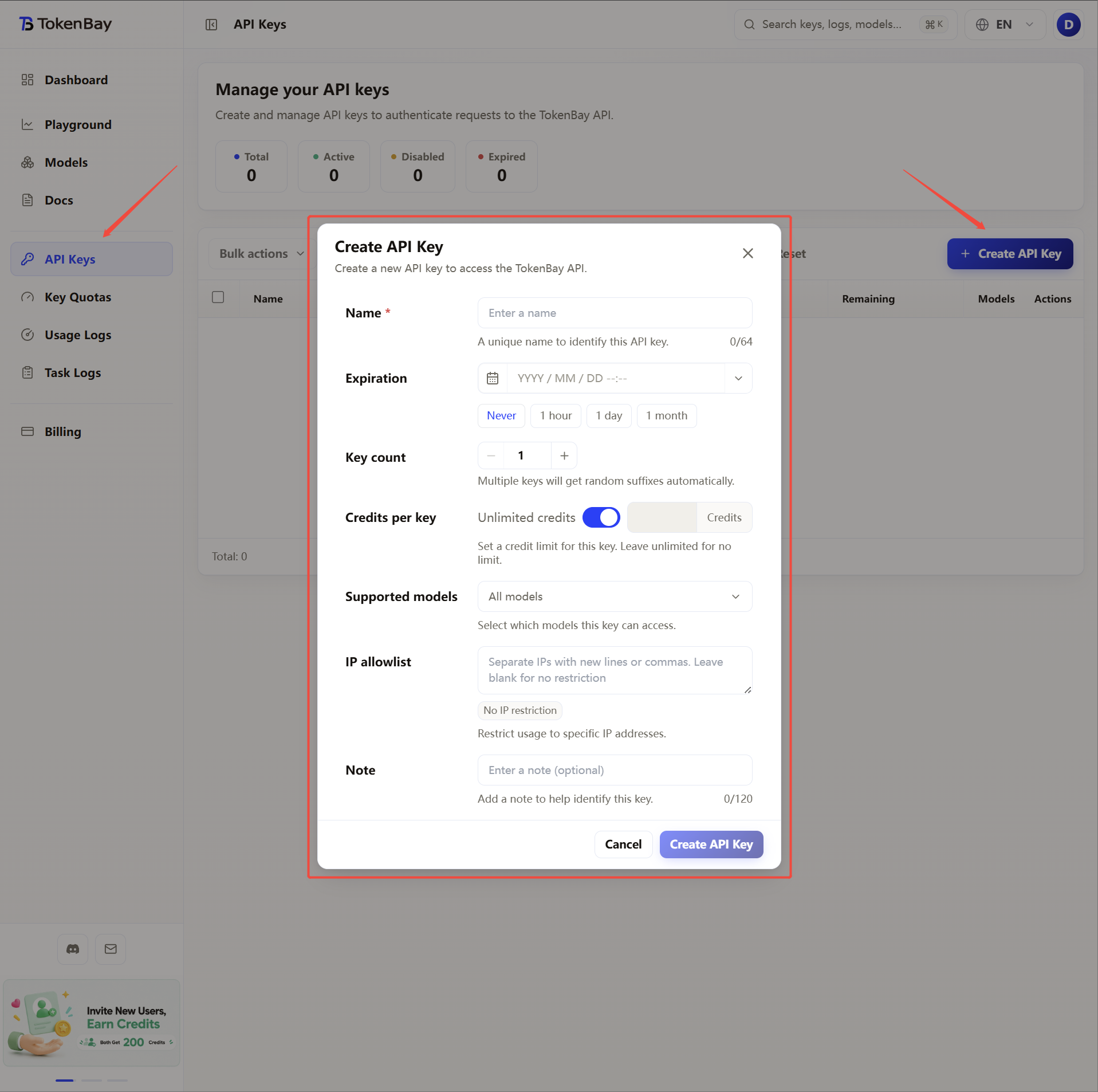
1. Get an API key
Log in to the TokenBay console → API keys → Create key.
Once the key is created, copy the full string starting with sk-.
The plain text shows only once and can’t be viewed again after you leave the page.
2. Update the configuration
Claude Code supports two approaches — environment variables and a config file. Pick whichever you prefer.
Environment variables
| Variable | Value |
|---|---|
ANTHROPIC_BASE_URL | https://api.tokenbay.com |
ANTHROPIC_AUTH_TOKEN | Your TokenBay API key (sk-...) |
ANTHROPIC_API_KEY | Explicitly set to empty "" |
Critical: you must explicitly set
ANTHROPIC_API_KEYto an empty string. Once Claude Code detects this variable is non-empty (for example, a leftover official key), it will prefer using it to connect to Anthropic directly and ignoreANTHROPIC_AUTH_TOKEN, showing up as mysterious auth failures or “model not found” errors.
macOS / Linux (zsh or bash)
Append the three lines below to ~/.zshrc or ~/.bashrc, then run source ~/.zshrc to apply them:
export ANTHROPIC_BASE_URL="https://api.tokenbay.com"
export ANTHROPIC_AUTH_TOKEN="sk-XXXXXXX"
export ANTHROPIC_API_KEY=""
Windows (PowerShell, persistent user env)
[Environment]::SetEnvironmentVariable('ANTHROPIC_BASE_URL','https://api.tokenbay.com','User')
[Environment]::SetEnvironmentVariable('ANTHROPIC_AUTH_TOKEN','sk-XXXXXXX','User')
[Environment]::SetEnvironmentVariable('ANTHROPIC_API_KEY','','User')
Windows (CMD)
setx ANTHROPIC_BASE_URL "https://api.tokenbay.com"
setx ANTHROPIC_AUTH_TOKEN "sk-XXXXXXX"
setx ANTHROPIC_API_KEY ""
Both the PowerShell and CMD forms persist the env vars at user scope — open a new terminal window before they take effect.
Config file
If you’d rather not pollute the global env, use $HOME/.claude/settings.json (user-wide) or a project-local .claude/settings.json (project-wide, higher priority) instead:
{
  "env": {
    "ANTHROPIC_BASE_URL": "https://api.tokenbay.com",
    "ANTHROPIC_AUTH_TOKEN": "sk-XXXXXXX",
    "ANTHROPIC_API_KEY": ""
  }
}
3. Model configuration
Recommended models:
| Use case | Model ID |
|---|---|
| Everyday coding | claude-sonnet-4.6 |
| Deep reasoning / long context | claude-opus-4.8 |
| Lightweight | claude-haiku-4.5 |
See the full list at Models.
Note: in model names, the version number only accepts the dotted form (e.g.
claude-sonnet-4.6) — don’t write it with hyphens (claude-sonnet-4-6).
Model configuration can be written into the env vars alongside the credentials above, for example:
export ANTHROPIC_BASE_URL="https://api.tokenbay.com"
export ANTHROPIC_AUTH_TOKEN="sk-XXXXXXX"
export ANTHROPIC_API_KEY=""
export ANTHROPIC_DEFAULT_OPUS_MODEL="claude-opus-4.8"
export ANTHROPIC_DEFAULT_SONNET_MODEL="claude-sonnet-4.6"
export ANTHROPIC_DEFAULT_HAIKU_MODEL="claude-haiku-4.5"
export ANTHROPIC_MODEL="sonnet"
Or merge them into settings.json:
{
  "env": {
    "ANTHROPIC_BASE_URL": "https://api.tokenbay.com",
    "ANTHROPIC_AUTH_TOKEN": "sk-XXXXXXX",
    "ANTHROPIC_API_KEY": "",
    "ANTHROPIC_DEFAULT_OPUS_MODEL": "claude-opus-4.8",
    "ANTHROPIC_DEFAULT_SONNET_MODEL": "claude-sonnet-4.6",
    "ANTHROPIC_DEFAULT_HAIKU_MODEL": "claude-haiku-4.5",
    "ANTHROPIC_MODEL": "sonnet"
  }
}
4. Advanced configuration
Deep reasoning or long-context tasks take a while, and the default timeout may cut requests off.
API_TIMEOUT_MS raises the timeout ceiling for a single request (in milliseconds — for example 600000 is about 10 minutes).
{
  "env": {
    "ANTHROPIC_BASE_URL": "https://api.tokenbay.com",
    "ANTHROPIC_AUTH_TOKEN": "sk-XXXXXXX",
    "ANTHROPIC_DEFAULT_OPUS_MODEL": "claude-opus-4.8",
    "ANTHROPIC_DEFAULT_SONNET_MODEL": "claude-sonnet-4.6",
    "ANTHROPIC_DEFAULT_HAIKU_MODEL": "claude-haiku-4.5",
    "ANTHROPIC_MODEL": "sonnet",
    "API_TIMEOUT_MS": "600000"
  }
}
5. Clear the official login cache
If you’ve previously logged in to Claude Code with an Anthropic account, the cached login state will conflict with your gateway credentials. On startup you may see an auth-conflict warning, which shows up as mysterious “model not found” errors.
Before switching to TokenBay, log out once inside a session:
/logoutThen fully quit and restart claude so it picks up the new env vars. Users who have never logged in with an Anthropic account can skip this step.
Note:
/logoutonly clears the cached login state — it does not clear a leftoverANTHROPIC_API_KEYin your shell. If that variable still points at an old official key, set it to empty per section 2 and reopen the terminal.
6. Verify the connection
Once inside a session, run /status to confirm you’re going through TokenBay rather than the official endpoint:
/statusAuth token should read ANTHROPIC_AUTH_TOKEN, and Anthropic base URL should read https://api.tokenbay.com.
7. Troubleshooting
| Symptom | Cause and fix |
|---|---|
| Model not found / auth failure | Usually a credential conflict. First confirm ANTHROPIC_API_KEY="" is set to empty in your shell and reopen the terminal; then /logout inside the session and restart claude. |
| Still getting auth errors after emptying the key | A cached login state remains. Run /logout and restart claude. Use /status to double-check the base URL and auth source. |
| Env-var changes don’t take effect | Env vars only get read in a new terminal; settings.json changes require restarting claude. |
| Context limit exceeded | Split the task or start a new session (/clear). |