
CC Switch
- Homepage: ccswitch.io
- Docs: ccswitch.io/docs
- GitHub: github.com/farion1231/cc-switch
- Manages: Claude Code, Claude Desktop, Codex, Gemini CLI, OpenCode, OpenClaw, Hermes Agent
- Protocol: defines no protocol of its own — it depends on the CLI being managed (Claude Code → Anthropic Messages; Codex → OpenAI Responses)
CC Switch is a graphical config manager: it doesn’t send requests on behalf of each CLI, but instead atomically writes the “provider config” you’ve filled in into the actual config file / env vars each CLI reads from (Claude Code → ~/.claude/settings.json, Codex → ~/.codex/config.toml, and so on). Requests are still sent by each CLI directly to TokenBay.
Install
System requirements (defer to the official downloads page):
- Windows: Windows 10 and above
- macOS: macOS 12 (Monterey) and above
- Linux: mainstream distributions such as Ubuntu 22.04+ / Debian 11+ / Fedora 34+
macOS (Homebrew, recommended)
brew install --cask cc-switchUpgrade:
brew upgrade --cask cc-switchThe macOS build is signed and notarized by Apple, so it opens directly after download. You can also manually download CC-Switch-v{version}-macOS.dmg (recommended) or the .zip from Releases.
Windows
Download the CC-Switch-v{version}-Windows.msi installer, or the portable CC-Switch-v{version}-Windows-Portable.zip, from Releases.
Arch Linux
paru -S cc-switch-binOther Linux
Download the matching package from Releases:
CC-Switch-v{version}-Linux.deb(Debian / Ubuntu)CC-Switch-v{version}-Linux.rpm(Fedora / RHEL / openSUSE)CC-Switch-v{version}-Linux.AppImage(universal)
After installing, open the app — the version number is shown in the top-left corner. To verify whether each managed CLI is ready, use that CLI’s own command (such as claude --version or codex --version).
Connect TokenBay
How it works
CC Switch maintains a set of “Providers” for each CLI. When adding a provider you can choose a built-in preset or build a custom config; fill in the Base URL and API key, then click Enable, and CC Switch writes the config to that CLI’s real config location:
- Claude Code: writes
ANTHROPIC_BASE_URLandANTHROPIC_AUTH_TOKENinto~/.claude/settings.json, supports hot-switching, no session restart needed. - Codex: writes
model_providerand[model_providers.*]into~/.codex/config.tomland puts the API key into an env var; you need to restart thecodexprocess after switching.
Credentials are passed in each CLI’s native way (Claude Code uses ANTHROPIC_AUTH_TOKEN as the Bearer token; Codex reads the env var specified by env_key).
Don’t mangle the path in the Base URL: Claude Code uses the bare gateway
https://api.tokenbay.com(it appends/v1/messagesitself); Codex uses the OpenAI Responses protocol and needs the/v1, written ashttps://api.tokenbay.com/v1(it only appends/responses). Neither should have a trailing slash.
1. Get an API key
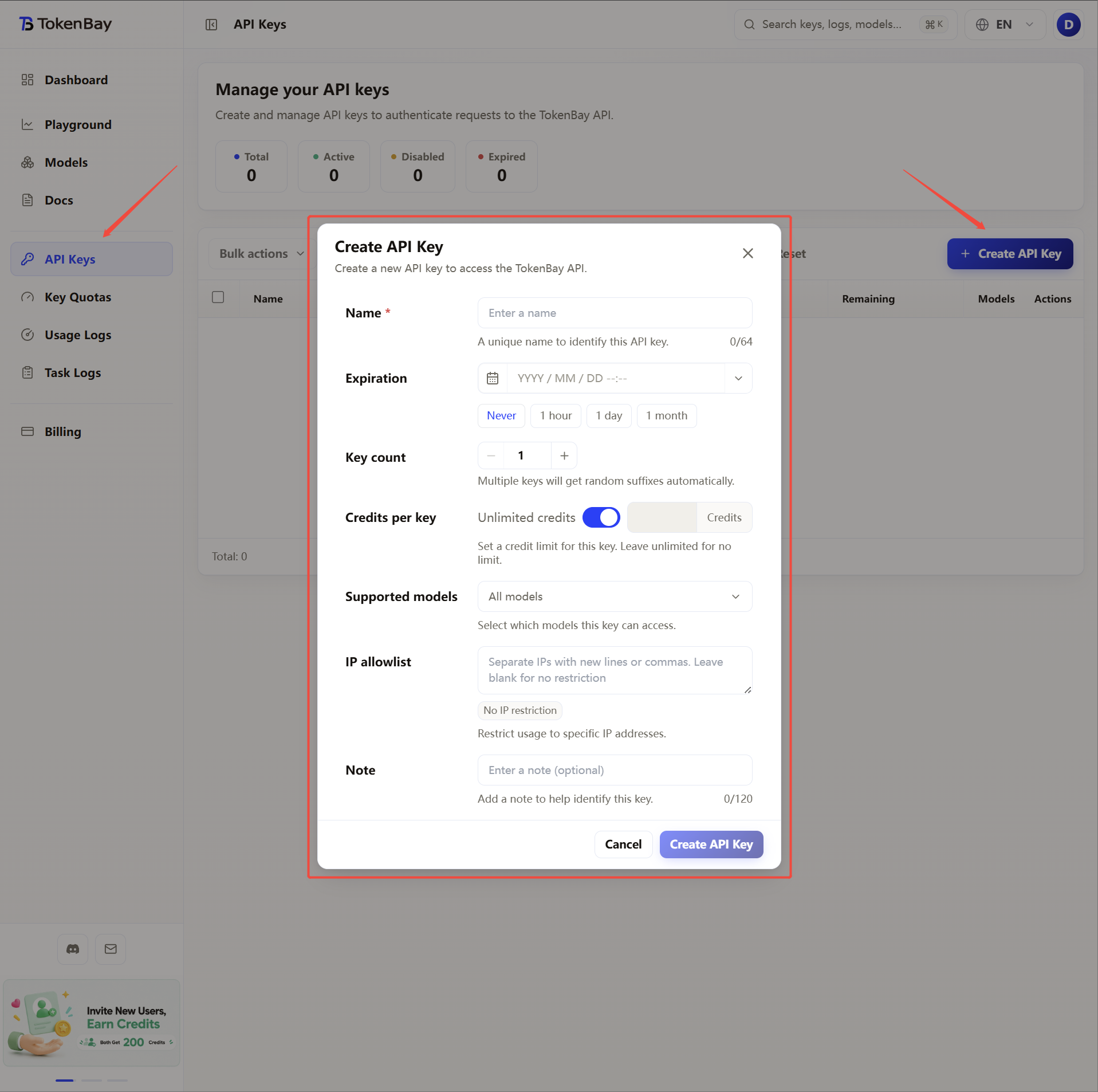
Log in to the TokenBay console → API keys → Create key. Copy the full string starting with sk-. The plain text shows only once and can’t be viewed again after you leave the page.
2. Add a provider for Claude Code
Open the CC Switch main window, pick the Claude Code tab in the left sidebar → Add Provider at the top → choose custom config, and fill in the table below:
| Field | Value |
|---|---|
| Provider Name | TokenBay |
| Base URL | https://api.tokenbay.com |
| Auth Token / API Key | Your TokenBay API key (sk-...) |
After saving, click Enable in the list, and CC Switch immediately writes ANTHROPIC_BASE_URL and ANTHROPIC_AUTH_TOKEN into ~/.claude/settings.json. Claude Code supports hot-switching — no session restart needed.
3. (Optional) Configure TokenBay for Codex too
Switch to the Codex tab, Add Provider → custom config:
| Field | Value written to ~/.codex/config.toml |
|---|---|
| Provider Name | TokenBay |
| Base URL | https://api.tokenbay.com/v1 |
| Env Key Name | TOKENBAY_API_KEY |
| Wire API | responses (currently the only value Codex supports; this is also the default if omitted) |
CC Switch writes the corresponding [model_providers.tokenbay] block and activates the top-level model_provider, while also writing the API key into the TOKENBAY_API_KEY env var. Codex doesn’t support hot-switching — restart the codex process after enabling.
4. Recommended models
CC Switch doesn’t restrict models; the model is chosen by each CLI itself. Common examples:
Claude Code
| Use case | Model ID |
|---|---|
| Everyday coding | claude-sonnet-4.6 |
| Deep reasoning / long context | claude-opus-4.8 |
| Lightweight | claude-haiku-4.5 |
Codex
| Use case | Model ID |
|---|---|
| Programming and code (recommended) | gpt-5.3-codex |
| General flagship / deep reasoning | gpt-5.5 |
| Cost-effective | gpt-5.4-mini |
Model IDs pass through to the upstream verbatim, with no prefix. See the full available list at Models.
Model name format: in TokenBay model names, the version number only accepts the dotted form (e.g.
claude-sonnet-4.6,gpt-5.4) — don’t write it with hyphens (claude-sonnet-4-6,gpt-5-4).The tables above are examples; for the exact Model ID, defer to the console Models page (or Models). Before connecting, confirm that your group is authorized for the model.
5. Advanced configuration
CC Switch is only responsible for writing the credentials and Base URL; long-task items like timeouts and retries need to be added in the corresponding CLI’s config. CC Switch preserves these custom fields when enabling a config (see “Don’t overwrite” below).
Deep reasoning or long-context tasks take a while, and the default timeout may cut requests off:
- Claude Code: add
API_TIMEOUT_MSto theenvblock in~/.claude/settings.json(in milliseconds — for example, 10 minutes is600000). - Codex: add
stream_idle_timeout_ms,request_max_retries, etc. to the[model_providers.tokenbay]block in~/.codex/config.toml.
{
  "env": {
    "ANTHROPIC_BASE_URL": "https://api.tokenbay.com",
    "ANTHROPIC_AUTH_TOKEN": "sk-XXXXXXX",
    "API_TIMEOUT_MS": "600000"
  }
}